←→ back / next ↑↓ section +− zoom ⇧+arrows pan Esc overview
0.05×
Hi
Hi, I’m Chris.
I build User Experiences - A Lead Front-End & UI Architect based in South Portland, Maine. With two decades of experience across enterprise platforms, fintech, and digital products, I build modern web software that balances high-performance architecture with rigorous digital accessibility.
Banking & Enterprise SystemsEngineering resilient, secure front ends for financial processing, invoicing platforms, and complex multi-tenant workflows.
Front-End ArchitectureScaling applications using Angular, TypeScript, and modern reactive patterns.
Engineering ExcellenceIntroducing automated unit testing frameworks, slashing pipeline bottlenecks, and deprecating technical debt.
Digital InclusivityArchitecting fully semantic, WCAG/ARIA-compliant interfaces that guarantee equal access for every user.
When I’m not architecting banking software, I’m usually experimenting with interactive graphics, procedural shaders, and audio synthesis in Canvas.
li
liquid
The sun, the moon… waves in between. Type a word and it drops into the water as a floating body that belly-flops, bobs and sinks. The sky comes from real sunrise, sunset and moon-phase maths for your location, the clouds follow live weather from Open-Meteo, and a screen-reader description narrates the scene. Angular 22, signals and layered canvas.
An interactive plasma globe on canvas. Lightning is fractal midpoint-displacement, the tentacles are verlet rope physics, and every touch point (multi-touch) pulls an arc toward your finger. Web Audio synthesises the buzz and a windchime that rings as each arc whips past, and arcs can react to your microphone. React 18, Vite and Vitest.
A glowing vector jellyfish drifting through a canvas scene. Its tentacles are verlet-integrated ropes with distance constraints that drape on the seabed, the seaweed branches fractally, and bokeh, orbs and a translucent bell shell add depth. Everything is drawn in 2D canvas by small single-purpose systems, inside an Angular 21 component.
A radial navigation menu of any depth. A recursive tree is flattened into rings that fan out around each parent, laid out with polar coordinates, and CSS transitions glide every item out from under its parent and back. It’s a standalone Angular 21 component driven by an input tree, emitting the chosen leaf as an output event.
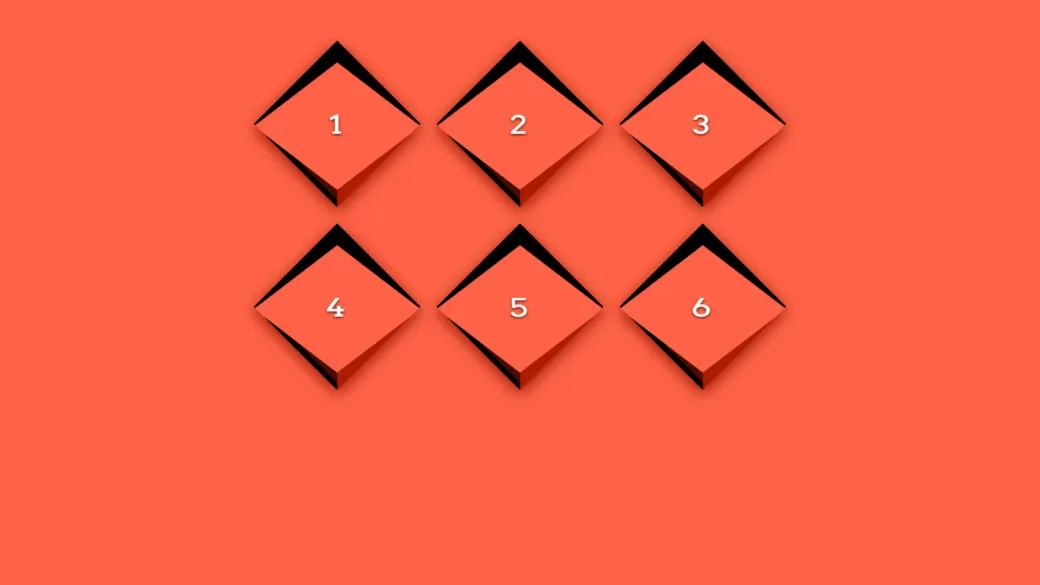
A menu of tilted, extruded diamond panels that settle flat on hover or keyboard focus. Ported from a CodePen (Pug and SCSS) to React 19, TypeScript and Vite, with the 3D geometry derived from two CSS variables, modern CSS with native nesting and relative colour, a labelled nav landmark, and reduced-motion support.
A login form that grows out of a single box, one step at a time: username, password, then remember me. Ported from legacy jQuery to React 19 and TypeScript as a small state machine with an async credential check, a shake on failure, and confetti that bursts from the caret as you type. Built with Vite and tested with Vitest.
A demo store with 40 products, built with Angular 20 standalone components. Filters, sorting, pagination and grid/list view all live in the URL, so every state is linkable. It has lazy-loaded routes, an auth guard, signal-based cart and favorites saved to localStorage, Web Share with a clipboard fallback, and prerendered pages served by Express.
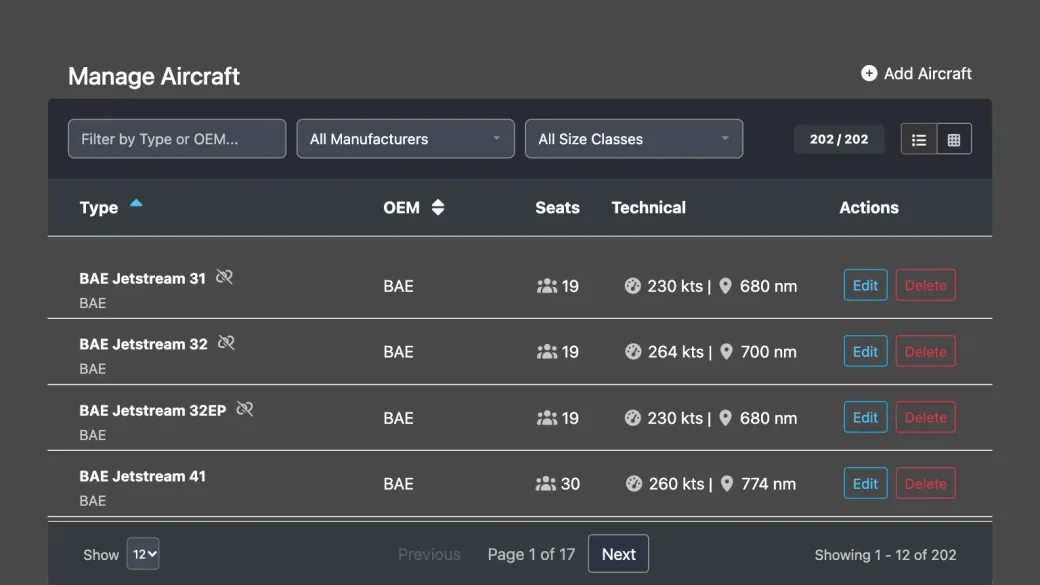
An aircraft fleet manager built with Angular 14, reactive forms and RxJS. Aircraft are filtered, sorted and paged on the client over a 202-aircraft mock fleet. Adding a variant checks the whole fleet first, and if another aircraft already owns it the form warns you and offers to jump to that aircraft instead of calling the backend.
A generative homage to Hokusai’s The Great Wave off Kanagawa. The wave, Fuji, boats and paper grain are all drawn in code on a canvas, and the foam is fractal: every claw splits into smaller curling claws, level after level. A looping cycle builds the wave, bursts the foam, then dissolves it, and every cycle draws a different wave. Angular 22, with a controls panel and reduced-motion support.
A Giger-style biomechanical fractal: a WebGL raymarcher flies you down a ribbed, cable-strung tunnel of bone and machinery. Drag to look and scroll to zoom, switch between six presets (Passage Temple, Necronom IV, Birth Machine, Space Jockey, Biomechanoid Hive and Vertebrae Gallery), tune nearly twenty parameters live, and add an optional dark-ambient drone. Angular 22 with Angular Material controls.
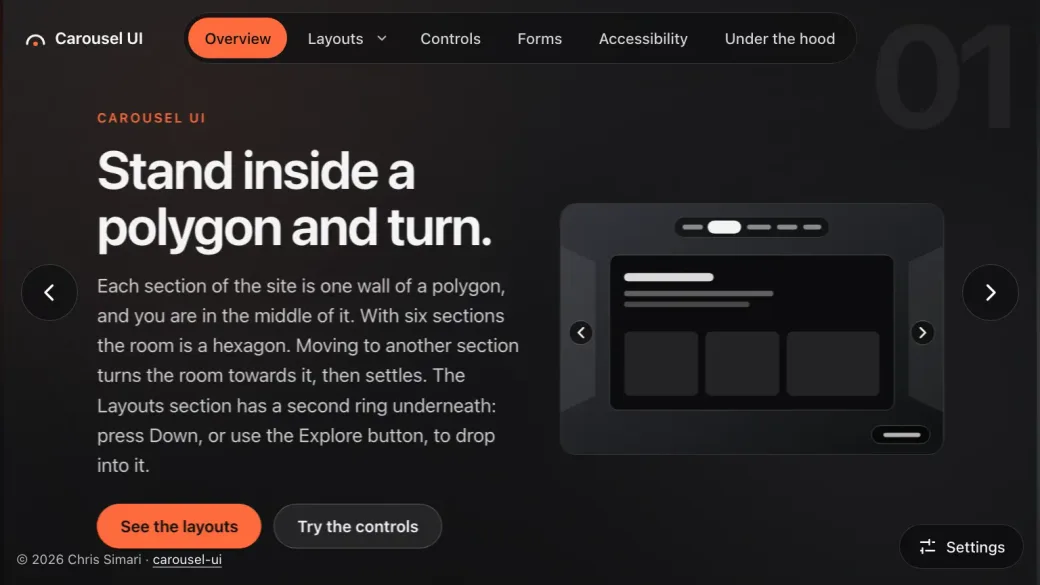
A navigation you stand inside: each section is one wall of a polygon and moving between them turns the room. Seven views of the same content (prism, pinwheel, carousel, coverflow, ring, deck and a plain list), with a second ring of sub-panels beneath Layouts. The address bar is the source of truth, so links, reloads and the back button all land in the right place. Built with Angular 22 signals, with keyboard and swipe controls, ARIA carousel semantics, reduced-motion support and prerendered pages.
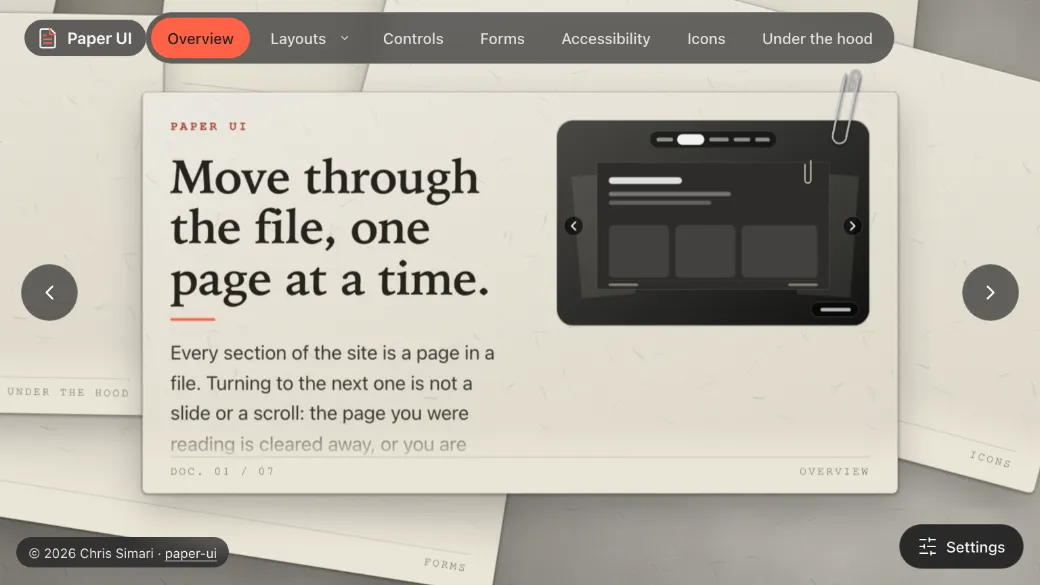
A navigation through a file of documents: each section is a sheet of paper on a grey desk, and moving between them handles the paper. Eight views of the same content (desk, crumple, burn, fold, stack, pad, files and a plain list), with a second stack of sub-pages beneath Layouts. The address bar is the source of truth, so links, reloads and the back button all land in the right place. Built with Angular 22 signals, with keyboard and swipe controls, ARIA carousel semantics, reduced-motion support and prerendered pages.
Architectural depth meets spatial web design: how this portfolio became an infinite, zoomable canvas without giving up semantic HTML, keyboard access or performance.
AngularTypeScriptCanvasSignalsAccessibilityPWA
Si
Case study 02
SimaBox
A family chore and rewards app: goals that unlock on time, points kept as a ledger, a little store, and alerts that reach people even when the app is closed. A private project.
AngularFirebaseSignalsMaterial 3PWAPlaywright
Se
Send a signal
Whether you’re looking to scale an enterprise front end, build out accessible design systems, or tackle complex platform modernization, I’m always open to discussing new engineering opportunities.
Drop a note here or connect directly via LinkedIn or email to kick off a conversation. I look forward to hearing what you're building.
Ne
Next experiment…
Have an idea you’d like to bring to life? Tell me what you’re imagining — a prototype, an interface, an experiment — and I’ll write back.
Chris Simarieverything, as a list
About
Hi, I’m Chris.
I build User Experiences - A Lead Front-End & UI Architect based in South Portland, Maine. With two decades of experience across enterprise platforms, fintech, and digital products, I build modern web software that balances high-performance architecture with rigorous digital accessibility.
What I focus on
Banking & Enterprise Systems: Engineering resilient, secure front ends for financial processing, invoicing platforms, and complex multi-tenant workflows.
Front-End Architecture: Scaling applications using Angular, TypeScript, and modern reactive patterns.
Engineering Excellence: Introducing automated unit testing frameworks, slashing pipeline bottlenecks, and deprecating technical debt.
Digital Inclusivity: Architecting fully semantic, WCAG/ARIA-compliant interfaces that guarantee equal access for every user.
When I’m not architecting banking software, I’m usually experimenting with interactive graphics, procedural shaders, and audio synthesis in Canvas.
The sun, the moon… waves in between. Type a word and it drops into the water as a floating body that belly-flops, bobs and sinks. The sky comes from real sunrise, sunset and moon-phase maths for your location, the clouds follow live weather from Open-Meteo, and a screen-reader description narrates the scene. Angular 22, signals and layered canvas.
An interactive plasma globe on canvas. Lightning is fractal midpoint-displacement, the tentacles are verlet rope physics, and every touch point (multi-touch) pulls an arc toward your finger. Web Audio synthesises the buzz and a windchime that rings as each arc whips past, and arcs can react to your microphone. React 18, Vite and Vitest.
A glowing vector jellyfish drifting through a canvas scene. Its tentacles are verlet-integrated ropes with distance constraints that drape on the seabed, the seaweed branches fractally, and bokeh, orbs and a translucent bell shell add depth. Everything is drawn in 2D canvas by small single-purpose systems, inside an Angular 21 component.
A radial navigation menu of any depth. A recursive tree is flattened into rings that fan out around each parent, laid out with polar coordinates, and CSS transitions glide every item out from under its parent and back. It’s a standalone Angular 21 component driven by an input tree, emitting the chosen leaf as an output event.
A menu of tilted, extruded diamond panels that settle flat on hover or keyboard focus. Ported from a CodePen (Pug and SCSS) to React 19, TypeScript and Vite, with the 3D geometry derived from two CSS variables, modern CSS with native nesting and relative colour, a labelled nav landmark, and reduced-motion support.
A login form that grows out of a single box, one step at a time: username, password, then remember me. Ported from legacy jQuery to React 19 and TypeScript as a small state machine with an async credential check, a shake on failure, and confetti that bursts from the caret as you type. Built with Vite and tested with Vitest.
A demo store with 40 products, built with Angular 20 standalone components. Filters, sorting, pagination and grid/list view all live in the URL, so every state is linkable. It has lazy-loaded routes, an auth guard, signal-based cart and favorites saved to localStorage, Web Share with a clipboard fallback, and prerendered pages served by Express.
An aircraft fleet manager built with Angular 14, reactive forms and RxJS. Aircraft are filtered, sorted and paged on the client over a 202-aircraft mock fleet. Adding a variant checks the whole fleet first, and if another aircraft already owns it the form warns you and offers to jump to that aircraft instead of calling the backend.
A generative homage to Hokusai’s The Great Wave off Kanagawa. The wave, Fuji, boats and paper grain are all drawn in code on a canvas, and the foam is fractal: every claw splits into smaller curling claws, level after level. A looping cycle builds the wave, bursts the foam, then dissolves it, and every cycle draws a different wave. Angular 22, with a controls panel and reduced-motion support.
A Giger-style biomechanical fractal: a WebGL raymarcher flies you down a ribbed, cable-strung tunnel of bone and machinery. Drag to look and scroll to zoom, switch between six presets (Passage Temple, Necronom IV, Birth Machine, Space Jockey, Biomechanoid Hive and Vertebrae Gallery), tune nearly twenty parameters live, and add an optional dark-ambient drone. Angular 22 with Angular Material controls.
A navigation you stand inside: each section is one wall of a polygon and moving between them turns the room. Seven views of the same content (prism, pinwheel, carousel, coverflow, ring, deck and a plain list), with a second ring of sub-panels beneath Layouts. The address bar is the source of truth, so links, reloads and the back button all land in the right place. Built with Angular 22 signals, with keyboard and swipe controls, ARIA carousel semantics, reduced-motion support and prerendered pages.
A navigation through a file of documents: each section is a sheet of paper on a grey desk, and moving between them handles the paper. Eight views of the same content (desk, crumple, burn, fold, stack, pad, files and a plain list), with a second stack of sub-pages beneath Layouts. The address bar is the source of truth, so links, reloads and the back button all land in the right place. Built with Angular 22 signals, with keyboard and swipe controls, ARIA carousel semantics, reduced-motion support and prerendered pages.
Architectural depth meets spatial web design: how this portfolio became an infinite, zoomable canvas without giving up semantic HTML, keyboard access or performance.
Chris Simari, Lead Front-End & UI Architect / Senior Software Engineer
Domain
Front-end architecture, creative engineering, digital accessibility and enterprise UI systems
Executive summary
A portfolio that is a place, not a page
Most engineering portfolios rely on standard vertical-scrolling cards or templated layouts.
chrissimari.com breaks convention by presenting an interactive, pan-and-zoom spatial canvas, while keeping strict semantic accessibility and progressive enhancement.
A professional CV
For enterprise software engineering.
An interactive sandbox
Showcasing low-level browser APIs: HTML5 2D Canvas, Web Audio and physics engines.
1 · Spatial UI
An infinite, zoomable canvas
At the core of the experience is an infinite, zoomable 2D workspace.
← →: Cycle through projects
↑ ↓: Switch thematic sections
+ −: Zoom in and out
⇧ arrows: Pan smoothly across the canvas
Esc: Return straight to the overview
Infinite canvas navigation
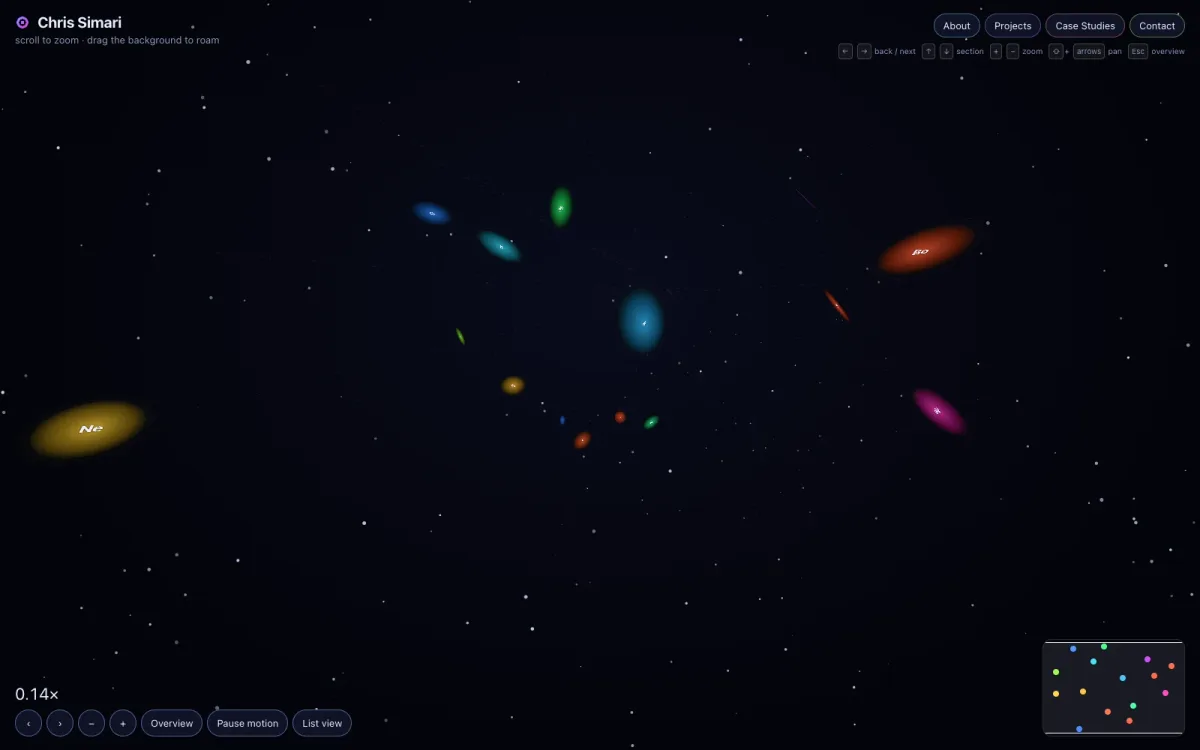
Pan, click-and-drag to roam, and pinch or scroll to zoom across the nodes of the portfolio: Overview, About, Projects, Case Studies and Contact.
Precise zoom HUD
Dynamic zoom feedback (0.77× and counting) with quick-jump selection menus to move between sections.
1 · Spatial UI
Detail that follows the zoom
The canvas isn’t just big, it is layered. What you see depends on how close you are.
Semantic zoom
Each slide fades its detail in continuously as it grows on screen: first the picture and title, then the description, tags and links. Zoomed far out, a slide collapses to a glowing orb.
Depth you can feel
In the overview every slide hangs at its own angle and depth, the same on every visit. As the camera flies toward one it unwinds to exactly flat and lands at native size, the crispest the text can be.
Calm when you pause
After a few idle seconds everything but the slide being read settles back. Any movement brings it straight back, and the whole effect is off for reduced motion or high contrast.
2 · Dual-mode UX
Digital inclusivity, first
A common pitfall of canvas-driven websites is that they break accessibility standards (WCAG) and hinder screen readers. The architecture of chrissimari.com tackles this directly.
Dual view paradigm
Switch at any time between the roaming 2D canvas and an accessible, semantic list view (“everything, as a list”) made for linear reading and screen readers. Its bokeh is always the colour opposite the logo’s dot: violet over yellow, and as the dot turns, so does the water.
Progressive enhancement
Non-JS fallbacks: the site degrades cleanly where JavaScript or hardware-accelerated canvas is disabled or unsupported.
Reduced motion
Interactive animations and canvas shaders have built-in controls and respect the system’s prefers-reduced-motion setting.
Semantic ARIA layering
WCAG and ARIA standards are built into every custom component, so focus states, landmarks and headings are properly exposed to assistive technology.
3 · Featured demos
Creative computation
The portfolio is organised around distinct projects, each running live in the page.
Click to run a demo inside its slide. It stays inert until then, so scrolling and dragging still move the canvas, and only one runs at a time so the whole thing stays smooth.
liquid
An interactive fluid-body simulation: typed words drop into water as floating rigid bodies that bob, splash and sink.
Angular
TypeScript
Signals
Layered canvas
Open-Meteo API
Web Audio synthesizer
Generative audio that creates micro-soundscapes (wind chimes, hums), coupled with particle arcs that react to cursor velocity and microphone input.
React
Vite
Web Audio API
Vitest
Verlet physics & procedural canvas
Lightweight physics engines and procedural animation, run without heavy third-party game bundles.
Angular
TypeScript
Verlet integration
2D canvas
GreatWave
A mathematical fractal wave simulation with a customisable parameters panel and motion-sensitivity toggles.
Angular
Canvas fractals
Procedural shaders
3 · Featured demos
Enterprise patterns, small interactions
The same discipline applied to enterprise state management and to modular UI.
SimpleCart & FleetManager
Deep URL routing that keeps sorting, filtering and view modes in linkable states, and reactive form pipelines.
Angular
RxJS
SSR / Express
Deep linking
State-machine micro-interactions
Modular patterns such as the DiamondMenu (recursive tree components) and a modernised, state-machine auth input with caret-based particle effects.
React
TypeScript
SCSS
4 · Technical stack
Engineering philosophy
The site reflects modern front-end best practice.
Reactive state management
Extensive use of Angular Signals and RxJS pipelines for decoupled event streams.
Progressive Web App
A web app manifest, custom app icons and an offline-capable service worker.
Strict type safety & automated testing
TypeScript, Vite and Vitest for deterministic builds and unit-tested interface logic.
Angular
TypeScript
Signals
RxJS
Canvas
Web Audio
Vite
Vitest
SCSS
PWA
SSR
4 · Engineering decisions
Small decisions, measured
Most of the craft here is in problems you only notice when they are solved.
Crisp text in a 3D scene
Text drawn inside a 3D scene is resampled and measurably softer. So once every slide is flat, the canvas drops its 3D scene entirely. Nothing visibly changes, and the text comes out roughly twice as sharp.
Phones are a different design
A phone starts on the plain list, which reads better than a zoomable canvas at that size. On the canvas, slides get narrower and taller, and a short phone shows a shorter About so it can be larger.
Contrast, even when dimmed
Idle dimming was tuned against the contrast ratio, not by eye: one step lower and a neighbouring slide’s bright button fell below 4.5:1. The dimmed state passes the accessibility checks.
Checked, not assumed
Unit tests cover the camera, the layout maths and the content, and automated axe audits run against the production build, including the offline service worker.
5 · Shipping it
A canvas that behaves like a website
A spatial interface only works if it still behaves like the web: addresses you can share, pages crawlers can read, and failures that fail gracefully.
Real addresses, prerendered
Every slide has its own address (/projects/liquid, /contact…) rendered to static HTML at build time, with its own title, description, canonical link, share cards and structured data. The page then hydrates in the browser.
A custom 404 that is honest
Unknown addresses get a real 404 status and a space-flight 404 page. A returning visitor’s service worker would answer every navigation with the app, so the app spots an unknown address itself and hands over to the same page.
Analytics with consent
Google Tag Manager is not even loaded until the visitor accepts, so nothing is sent to Google before then. Ad signals stay off, a returning visitor’s choice is remembered, and a blocked script can never break the site.
Always up to date
The Projects section follows GitHub: new public repos get a card automatically, hand-written ones take over from them, and a daily rebuild publishes the changes.
Offline-capable
A service worker precaches the app shell so the site works offline after the first visit, and tells you when a newer version is ready.
Edge-hosted contact
Hosted on Cloudflare Workers. The contact form is validated again on the server, drops spam silently, and sends through Resend with the visitor as Reply-To.
Key takeaways
Creative range without giving up rigour
chrissimari.com is an exemplar (if I don’t say so myself 😉) of how a modern web portfolio can show creative capability without sacrificing performance or accessibility.
By packaging enterprise-grade code (SSR, signals, automated testing) alongside exploratory browser APIs (canvas, audio synthesis, physics), the site demonstrates both technical rigour and creative front-end design.
A family chore and rewards app: goals that unlock on time, points kept as a ledger, a little store, and alerts that reach people even when the app is closed. A private project.
A family chore and rewards app: a private project, designed and built end to end
Domain
Product design, front-end architecture, Firebase, notifications and automated testing
Executive summary
Chores, turned into a game worth playing
SimaBox is a family chore and good-behavior tracker. A grown-up sets up daily, weekly, monthly and annual goals plus a bonus list; kids check them off to earn points and spend them in a little store.
It is built like a product, not a toy: roles and approvals, a points ledger that can be audited, alerts that arrive with the app closed, and four suites of automated tests.
For kids
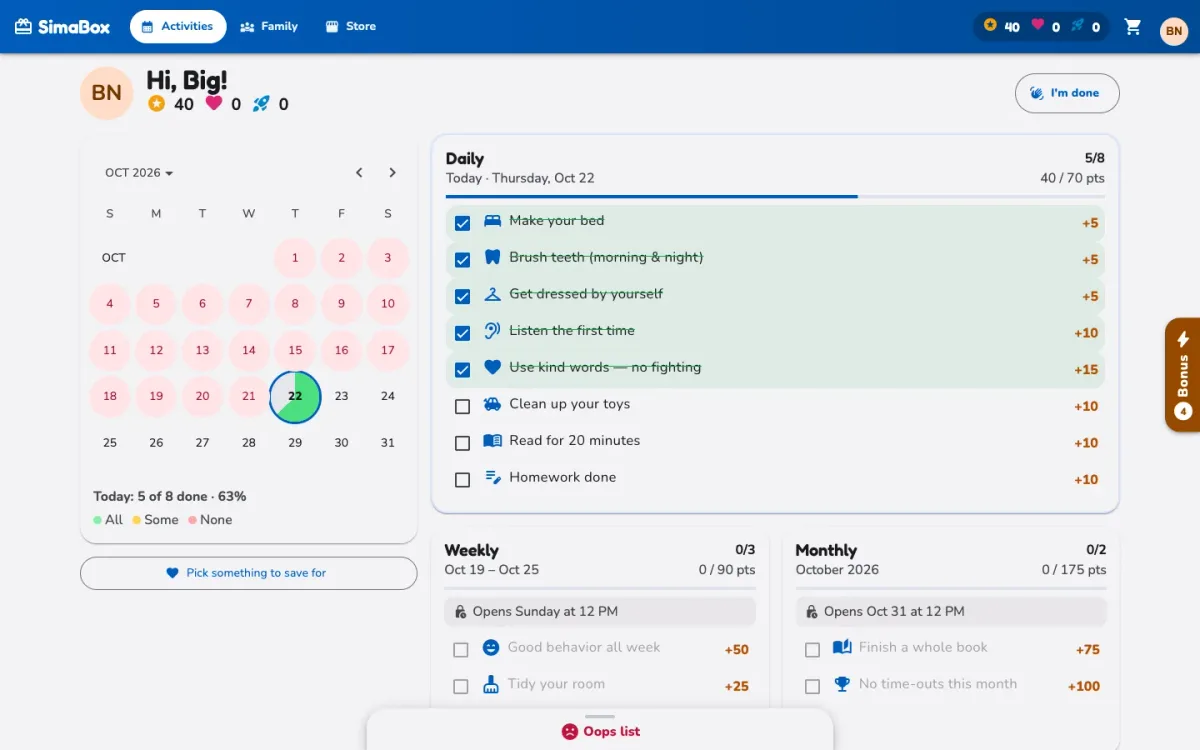
A calendar of finished days, a streak, a pie chart of today, goals that unlock at check-in time, and a store to spend points in.
For grown-ups
Edit every list, set who each task is for, approve orders and wishes, adjust points by hand and set the family’s rules.
1 · Made for kids
Bright, quick and rewarding
Kids sign in by tapping their face, and everything they need is on one screen.
Days you can see
A calendar marks each day as all done, some done or none, with a streak counter and a pie chart of today’s progress.
Goals that unlock on time
Weekly goals open on Sunday afternoon, monthly on the last day of the month and annual on December 31, with grace hours and catch-up days the family sets. Future days can’t be ticked off early, even by an admin.
Bonus and “oops” lists
Bonus goals can be checked off any time, some more than once. Grown-ups mark the things that go wrong on an “oops” list, which takes points away.
Celebrations
Confetti and a toast for every point earned, and fireworks when a whole list is finished.
2 · The rewards
An economy you can audit
Points are a ledger, not a number.
Every earn, spend, refund or adjustment is an entry, and a balance is just the sum, so history can’t drift and anything can be traced or undone. Each completion keeps a snapshot of its points, so changing a task’s value never rewrites the past.
More than one kind of point
Sima-Points, Mega-Sima-Points, Ultra-Sima-Points… Each task pays in one type and each store item costs one, so a grandparent’s list can have rewards of its own.
Store, cart and orders
Kids browse, save a wishlist and pick something to save for, with a progress bar. Grown-ups mark orders handed over, or cancel and refund them.
Wishes
Kids suggest new store items, and one click turns a wish into a real one.
3 · Grown-ups in charge
Every list, every rule, adjustable
The admin side is where a family makes SimaBox its own.
Lists
Create, edit, reorder and switch off activities in every list, and give them to everyone, to certain kids or to certain weekdays.
Personal lists
A list just for one kid. Any admin, such as a grandparent, can make one, like “From Grandma”.
By hand when needed
Give or take points with a reason, approve orders and wishes, and set the check-in windows.
4 · Families
Many families, one app
Each family has its own people, lists, points and store.
Start or join
Start a family from the sign-in screen, or ask to join one by name and wait for a grown-up to approve from an Approvals panel.
Roles
Admin, parent or guardian, grandparent and kid, each seeing and changing only what they should.
A family feed
Posts, photos, reactions, comments and high fives, with a parent checking a kid’s post first.
A look of its own
Four colour themes (Ocean, Violet, Forest and Candy), each in light and dark, with the family’s theme set in Settings.
5 · Architecture
No backend lock-in
Components and services only talk to two small interfaces, one for data and one for sign-in.
Two interchangeable backends
A demo mode that keeps everything in the browser, and Firebase Auth with Cloud Firestore. One file chooses between them; moving to another backend means writing one more of each.
Modern Angular
Angular 21 with standalone components, signals and no zone.js, Material 3 for the interface and Bootstrap only for the grid.
Security in the rules
Firestore security rules decide who can read and write what, and they are tested like any other code.
A PWA
Installs to the home screen, works offline, and offers a reload when a new version is ready.
Angular 21
TypeScript
Signals
Material 3
Firebase Auth
Cloud Firestore
Cloud Functions
Vitest
Playwright
PWA
6 · Reaching people
Alerts that arrive even when the app is closed
Standard Web Push through the app’s own service worker, with no third-party messaging service.
Join requests
A Cloud Function pushes to approved parents and admins when someone asks to join, throttled and protected against floods.
Orders and wishes
New orders, wishes and “ready” orders reach the right person the moment they happen.
A daily nudge
Kids who turn alerts on get a reminder at 6 PM in the family’s time zone.
7 · Quality
Every change ships with tests
Four suites, so a change in one place can’t quietly break another.
Unit tests
Vitest specs for every service, utility and shared component.
End to end
Playwright smoke tests of every page, on a laptop and on a phone, against the demo backend.
Security rules
The Firestore rules are tested in the emulator, case by case.
The real thing
Real Firebase sign-in, switching between accounts and the rules, end to end in the emulator against a fake project, so the real family’s data is never touched.
Key takeaways
A product, not a prototype
SimaBox brings the same instincts as this site to a very different place: a friendly face for the kids and a careful one for the grown-ups.
A points ledger that can’t drift, roles and approvals, security rules that are tested and alerts that reach people, built so any family can have its own.
Whether you’re looking to scale an enterprise front end, build out accessible design systems, or tackle complex platform modernization, I’m always open to discussing new engineering opportunities.